Data Representation
Learn each subtopic step by step, check yourself, practise past papers, then revise.
Start here
By the end of this chapter
- I can explain why computers represent all data in binary.
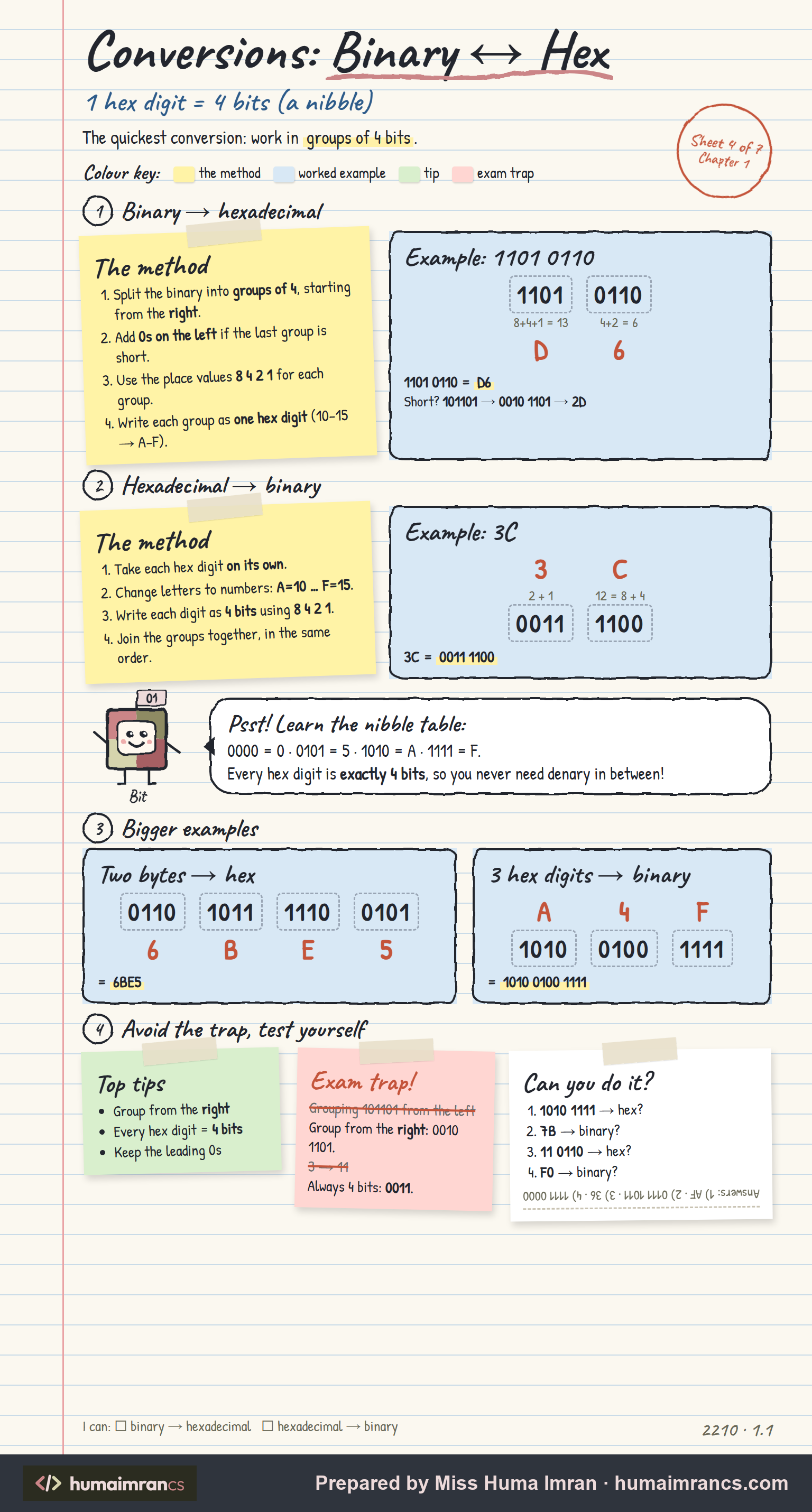
- I can convert between denary, binary and hexadecimal (up to 16 bits).
- I can explain the benefits of hexadecimal and give examples of where it is used.
- I can add two 8-bit binary numbers and explain overflow.
- I can perform logical shifts and use two's complement for negative numbers.
- I can describe how text, sound and images are represented, and calculate file sizes.
- I can compare lossy and lossless compression.
How to use this page
- Learn each subtopic in order: watch the Video lecture, read the Detailed notes, learn the Key terms, then try the labs and the practice questions.
- Read the Exam traps so you don't lose easy marks.
- Check yourself with the quiz: it shows which objectives need more work.
- Do the past-paper questions, then mark them with the answers.
- Before the exam, Revise with the full notes, infographics and revision key.
Syllabus
From the Cambridge O Level Computer Science 2210 syllabus for 2026, 2027 and 2028.
1.1 Number systems
Candidates should be able to:
- Understand how and why computers use binary to represent all forms of data
- (a) Understand the denary, binary and hexadecimal number systems
(b) Convert between
(i) positive denary and positive binary
(ii) positive denary and positive hexadecimal
(iii) positive hexadecimal and positive binary - Understand how and why hexadecimal is used as a beneficial method of data representation
- (a) Add two positive 8-bit binary integers
(b) Understand the concept of overflow and why it occurs in binary addition - Perform a logical binary shift on a positive 8-bit binary integer and understand the effect this has on the positive binary integer
- Use the two’s complement number system to represent positive and negative 8-bit binary integers
Notes and guidance
- Any form of data needs to be converted to binary to be processed by a computer
- Data is processed using logic gates and stored in registers
- Denary is a base 10 system
- Binary is a base 2 system
- Hexadecimal is a base 16 system
- Values used will be integers only
- Conversions in both directions, e.g. denary to binary or binary to denary
- Maximum binary number length of 16-bit
- Areas within computer science that hexadecimal is used should be identified
- Hexadecimal is easier for humans to understand than binary, as it is a shorter representation of binary
- An overflow error will occur if the value is greater than 255 in an 8-bit register
- A computer or a device has a predefined limit that it can represent or store, for example 16-bit
- An overflow error occurs when a value outside this limit should be returned
- Perform logical left shifts
- Perform logical right shifts
- Perform multiple shifts
- Bits shifted from the end of the register are lost and zeros are shifted in at the opposite end of the register
- The positive binary integer is multiplied or divided according to the shift performed
- The most significant bit(s) or least significant bit(s) are lost
- Convert a positive binary or denary integer to a two’s complement 8-bit integer and vice versa
- Convert a negative binary or denary integer to a two’s complement 8-bit integer and vice versa
1.2 Text, sound and images
Candidates should be able to:
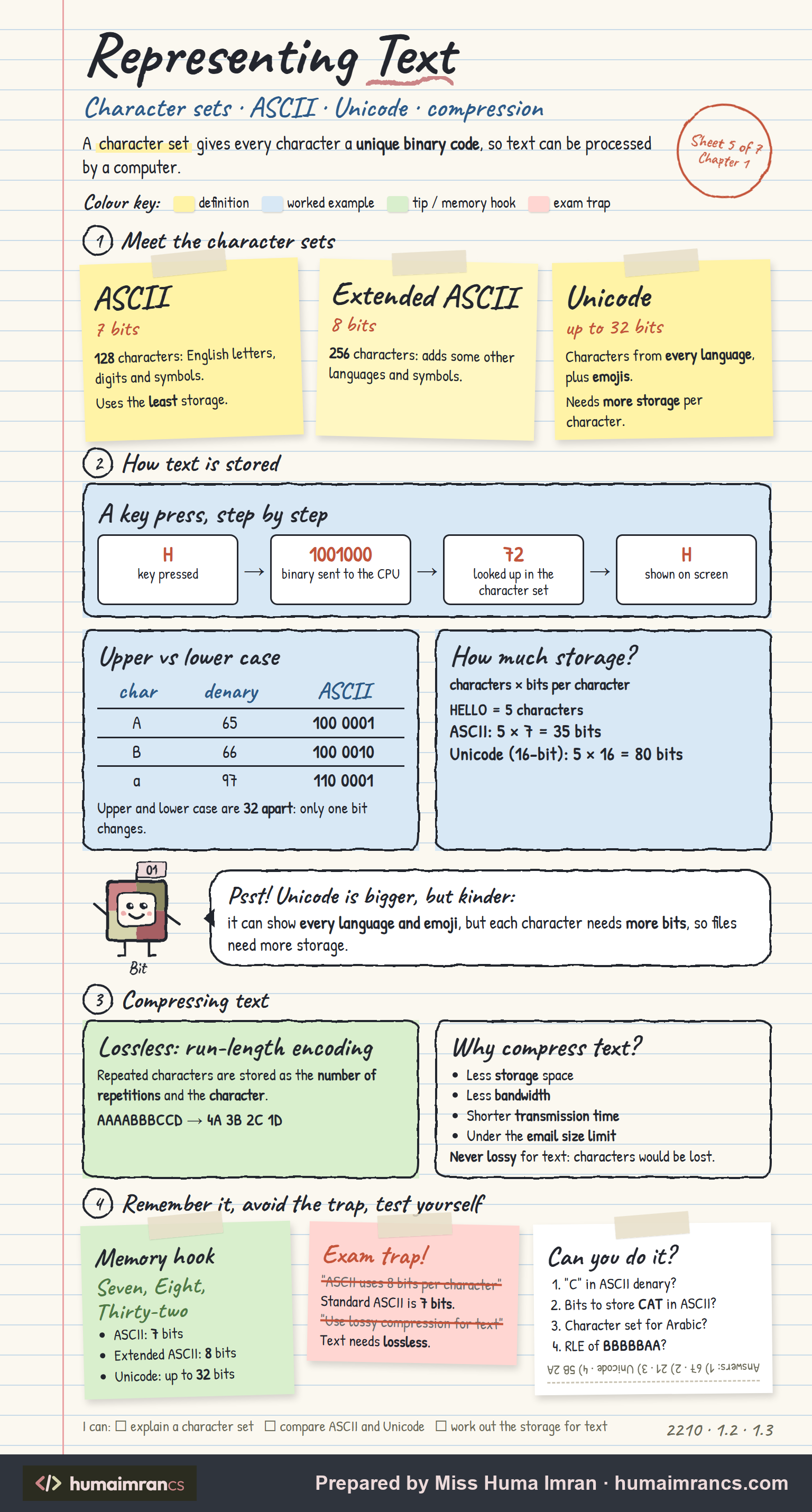
- Understand how and why a computer represents text and the use of character sets, including American standard code for information interchange (ASCII) and Unicode
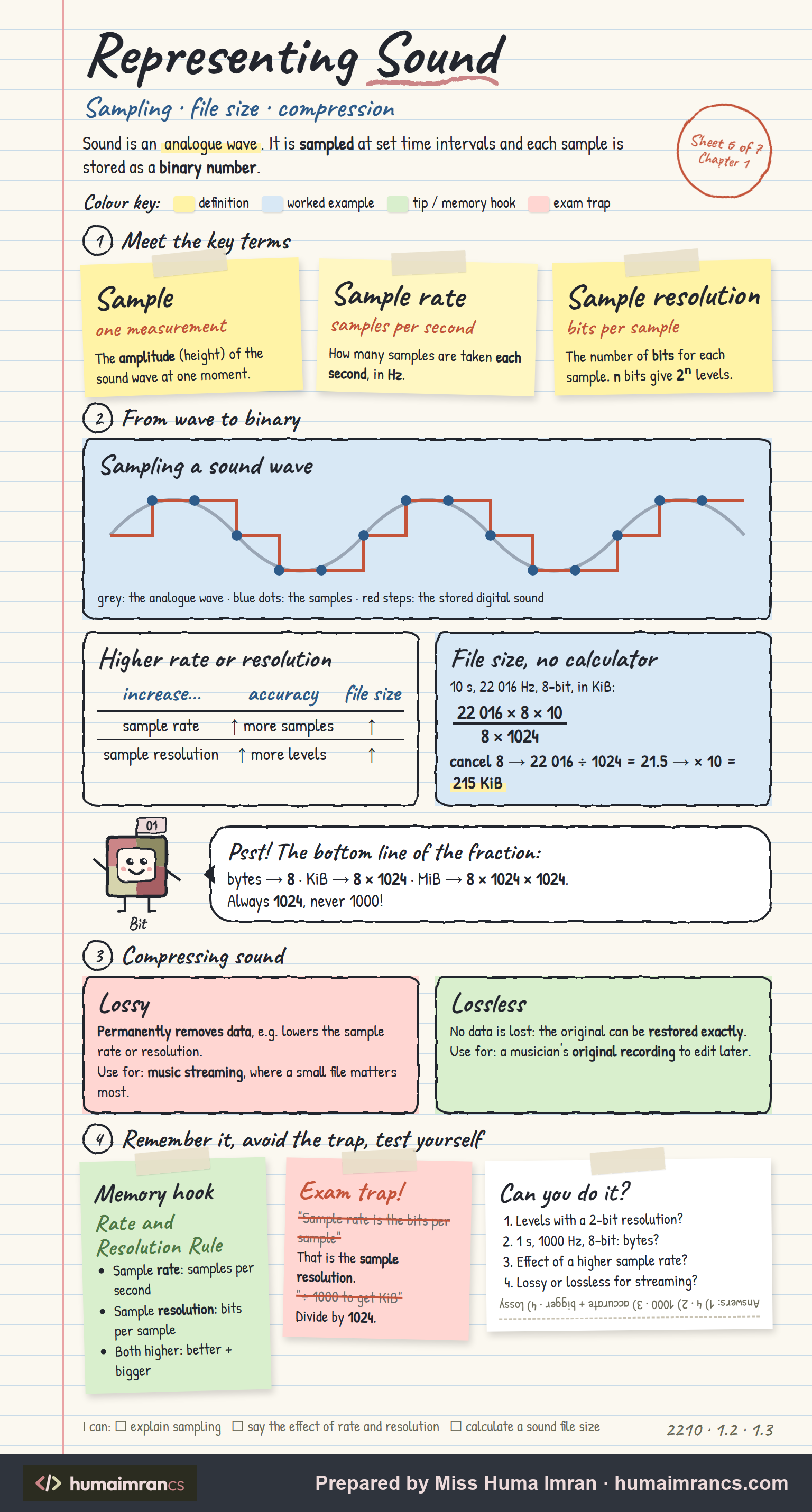
- Understand how and why a computer represents sound, including the effects of the sample rate and sample resolution
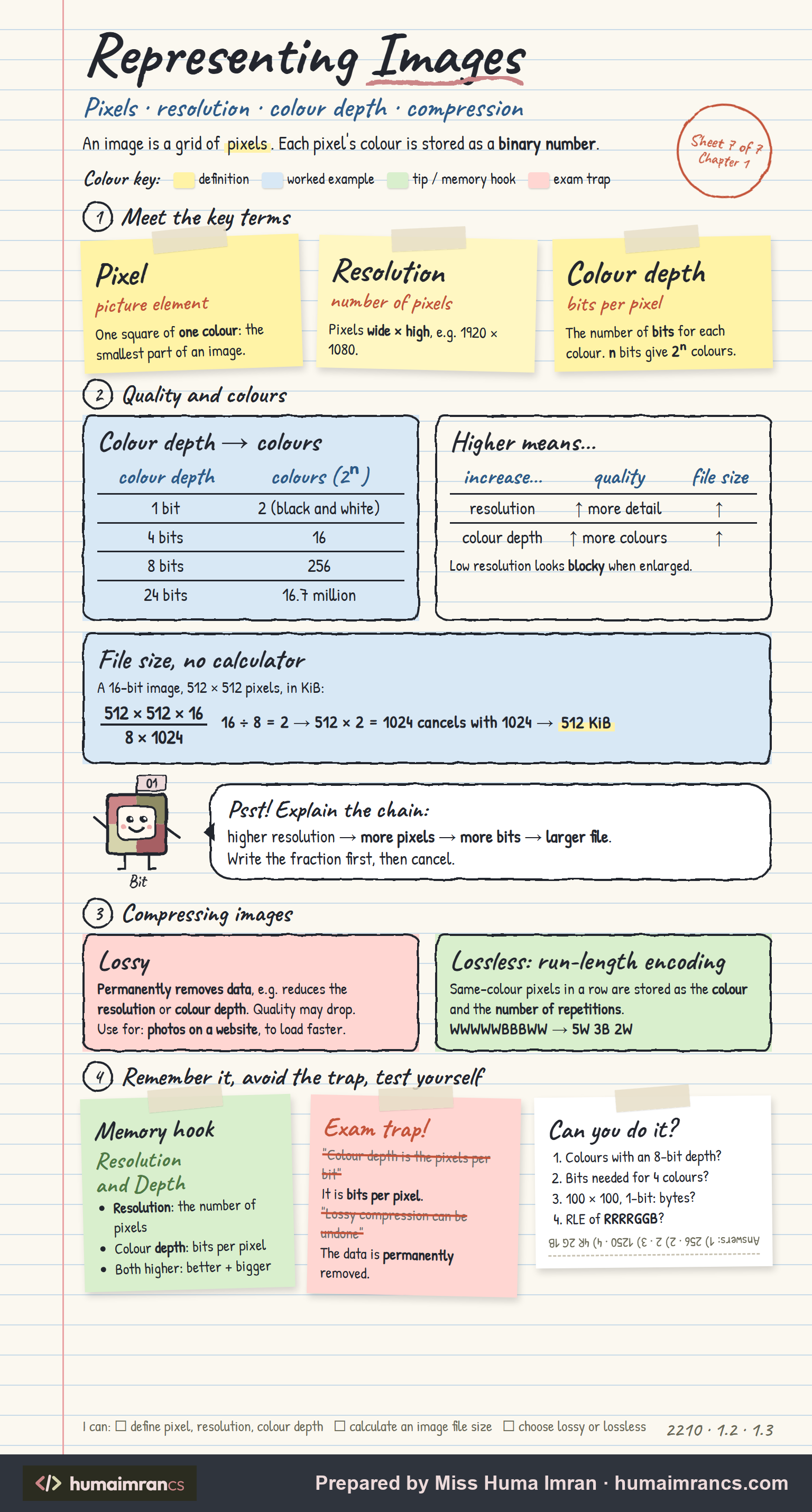
- Understand how and why a computer represents an image, including the effects of the resolution and colour depth
Notes and guidance
- Text is converted to binary to be processed by a computer
- Unicode allows for a greater range of characters and symbols than ASCII, including different languages and emojis
- Unicode requires more bits per character than ASCII
- A sound wave is sampled for sound to be converted to binary, which is processed by a computer
- The sample rate is the number of samples taken in a second
- The sample resolution is the number of bits per sample
- The accuracy of the recording and the file size increases as the sample rate and resolution increase
- An image is a series of pixels that are converted to binary, which is processed by a computer
- The resolution is the number of pixels in the image
- The colour depth is the number of bits used to represent each colour
- The file size and quality of the image increase as the resolution and colour depth increase
1.3 Data storage and compression
Candidates should be able to:
- Understand how data storage is measured
- Calculate the file size of an image file and a sound file, using information given
- Understand the purpose of and need for data compression
- Understand how files are compressed using lossy and lossless compression methods
Notes and guidance
- Including:
- bit
- nibble
- byte
- kibibyte (KiB)
- mebibyte (MiB)
- gibibyte (GiB)
- tebibyte (TiB)
- pebibyte (PiB)
- exbibyte (EiB)
- The amount of the previous denomination present in the data storage size, e.g.:
- 8 bits in a byte
- 1024 mebibytes in a gibibyte
- Answers must be given in the units specified in the question. Calculations must use the measurement of 1024 and not 1000
- Information given may include:
- image resolution and colour depth
- sound sample rate, resolution and length of track
- Compression exists to reduce the size of the file
- What the impact of this is, e.g.:
- less bandwidth required
- less storage space required
- shorter transmission time
- Lossy compression reduces the file size by permanently removing data, e.g. reducing resolution or colour depth, reducing sample rate or resolution
- Lossless compression reduces the file size without permanent loss of data, e.g. run length encoding (RLE)
 Prepared by Miss Huma Imran
1.1 Number systems
Video lecture
The video lecture for 1.1 Number systems is coming soon.
Until then, read the Detailed notes, or book a session and I will explain it to you live.
Book a slotPrepared by Miss Huma Imran1.1 Number systems
Detailed notes
What you need to know (1.1 syllabus)
From the Cambridge O Level Computer Science 2210 syllabus for 2026, 2027 and 2028.
1.1 Number systems
Candidates should be able to:
- Understand how and why computers use binary to represent all forms of data
- (a) Understand the denary, binary and hexadecimal number systems
(b) Convert between
(i) positive denary and positive binary
(ii) positive denary and positive hexadecimal
(iii) positive hexadecimal and positive binary - Understand how and why hexadecimal is used as a beneficial method of data representation
- (a) Add two positive 8-bit binary integers
(b) Understand the concept of overflow and why it occurs in binary addition - Perform a logical binary shift on a positive 8-bit binary integer and understand the effect this has on the positive binary integer
- Use the two’s complement number system to represent positive and negative 8-bit binary integers
Notes and guidance
- Any form of data needs to be converted to binary to be processed by a computer
- Data is processed using logic gates and stored in registers
- Denary is a base 10 system
- Binary is a base 2 system
- Hexadecimal is a base 16 system
- Values used will be integers only
- Conversions in both directions, e.g. denary to binary or binary to denary
- Maximum binary number length of 16-bit
- Areas within computer science that hexadecimal is used should be identified
- Hexadecimal is easier for humans to understand than binary, as it is a shorter representation of binary
- An overflow error will occur if the value is greater than 255 in an 8-bit register
- A computer or a device has a predefined limit that it can represent or store, for example 16-bit
- An overflow error occurs when a value outside this limit should be returned
- Perform logical left shifts
- Perform logical right shifts
- Perform multiple shifts
- Bits shifted from the end of the register are lost and zeros are shifted in at the opposite end of the register
- The positive binary integer is multiplied or divided according to the shift performed
- The most significant bit(s) or least significant bit(s) are lost
- Convert a positive binary or denary integer to a two’s complement 8-bit integer and vice versa
- Convert a negative binary or denary integer to a two’s complement 8-bit integer and vice versa
The notes for 1.1 Number systems. Use the buttons, the arrow keys, or swipe on a phone.
Loading…
Prepared by Miss Huma Imran1.1 Number systems
Practice questions
Every question is from a Cambridge past paper. Each topic is a set of 10 questions, and each new set gives you questions you have not had yet. Use the place value grid: click a bit to switch it between 0 and 1, then check your answer.
Read each situation and choose the best answer. Your first answer counts towards your score.
Prepared by Miss Huma Imran1.1 Number systems
Exam traps
Common ways students lose marks, with a wrong answer and the correct answer.
Leave out leading zeros and you lose the mark: an 8-bit answer must have all 8 bits.
✗ Wrong answer
110010
Only 6 bits. The question asks for 8 bits, so the leading zeros are needed.
✓ Correct answer
00110010
Hexadecimal does not use less memory and does not make the computer faster.
✗ Wrong answer
Hexadecimal takes up less memory, so the computer can process it faster.
Hexadecimal is still stored as binary. It only helps humans, so this earns no marks.
✓ Correct answer
It is easier for humans to read and understand than binary … because it is a shorter representation, so fewer mistakes are made.
IPv4 addresses are written in denary; IPv6 addresses are written in hexadecimal.
✗ Wrong answer
IPv4 is written in hexadecimal and IPv6 is written in denary.
The two formats are the wrong way round.
✓ Correct answer
IPv4 is written in denary, separated by dots (e.g. 192.168.0.1). IPv6 is written in hexadecimal, separated by colons.
When you divide by 16, read the remainders from the bottom up. The first remainder is the right-hand hex digit.
✗ Wrong answer
5A
165 ÷ 16 = 10 remainder 5, so 5 is the right-hand digit and 10 (A) is the left-hand digit. The digits have been written the wrong way round.
✓ Correct answer
A5
A hex number that only uses the digits 0 to 9 is still hexadecimal. Convert each digit to 4 bits; do not read it as a denary number.
✗ Wrong answer
1111
1111 is fifteen in denary. Hex 15 is the digit 1 (0001) followed by the digit 5 (0101).
✓ Correct answer
0001 0101
Each group of 4 bits becomes one hex character. Write 10 to 15 as A to F, never as two digits.
✗ Wrong answer
2138
1101 is thirteen, which is the single hex digit D. Writing 13 makes the number look like four hex digits.
✓ Correct answer
2D8
Two's complement is not just a 1 put in front of the positive number. Write the positive number in 8 bits, flip every bit, then add 1.
✗ Wrong answer
11001110
This is +78 (01001110) with the first bit changed to 1. In two's complement that is −128 + 78 = −50, not −78.
✓ Correct answer
+78 = 01001110 → flip: 10110001 → add 1: 10110010
In two's complement the left-most bit is worth −128. If it is 1, the denary number is negative.
✗ Wrong answer
163
163 treats the number as unsigned binary (128 + 32 + 2 + 1). The question says it is two's complement, so the 128 column counts as −128.
✓ Correct answer
−128 + 32 + 2 + 1 = −93
An 8-bit register cannot hold a 9th bit. If the addition carries out of the left-most bit, write the 8-bit result and say that an overflow error has occurred.
✗ Wrong answer
100101110
The answer does not identify the overflow. 245 + 57 = 302, which is more than 255, so the 9th bit cannot be stored in the 8-bit register. One mark is for showing that an overflow error has occurred.
✓ Correct answer
0010 1110, with a carry of 1 out of the left-most bit, so an overflow error has occurred
A logical shift moves the bits: bits pushed off the end are lost and the gaps are filled with 0s. The result is a whole number.
✗ Wrong answer
30.625
This is 245 ÷ 8. The three right-hand bits (101) are lost in the shift, so there is no fraction.
✓ Correct answer
00011110 = 16 + 8 + 4 + 2 = 30
Prepared by Miss Huma Imran1.2 Text, sound and images
Video lecture
The video lecture for 1.2 Text, sound and images is coming soon.
Until then, read the Detailed notes, or book a session and I will explain it to you live.
Book a slotPrepared by Miss Huma Imran1.2 Text, sound and images
Detailed notes
What you need to know (1.2 syllabus)
From the Cambridge O Level Computer Science 2210 syllabus for 2026, 2027 and 2028.
1.2 Text, sound and images
Candidates should be able to:
- Understand how and why a computer represents text and the use of character sets, including American standard code for information interchange (ASCII) and Unicode
- Understand how and why a computer represents sound, including the effects of the sample rate and sample resolution
- Understand how and why a computer represents an image, including the effects of the resolution and colour depth
Notes and guidance
- Text is converted to binary to be processed by a computer
- Unicode allows for a greater range of characters and symbols than ASCII, including different languages and emojis
- Unicode requires more bits per character than ASCII
- A sound wave is sampled for sound to be converted to binary, which is processed by a computer
- The sample rate is the number of samples taken in a second
- The sample resolution is the number of bits per sample
- The accuracy of the recording and the file size increases as the sample rate and resolution increase
- An image is a series of pixels that are converted to binary, which is processed by a computer
- The resolution is the number of pixels in the image
- The colour depth is the number of bits used to represent each colour
- The file size and quality of the image increase as the resolution and colour depth increase
The notes for 1.2 Text, sound and images. Use the buttons, the arrow keys, or swipe on a phone.
Loading…
Prepared by Miss Huma Imran1.2 Text, sound and images
Text, sound and image lab
Choose a tab: how text, sound and images are stored as binary.
See how every character you type is stored as binary with ASCII, extended ASCII and Unicode.
See and hear how sample rate and sample resolution change a recording.
Change the resolution and colour depth of a picture and see the effect on quality and file size.
Prepared by Miss Huma Imran1.2 Text, sound and images
Image and sound practice
Each topic is a set of 8 questions. Check each answer, use “Show working” if you are stuck, and see your score at the end.
Read each situation and choose the best answer. Your first answer counts towards your score.
Prepared by Miss Huma Imran1.2 Text, sound and images
Exam traps
Common ways students lose marks, with a wrong answer and the correct answer.
Colour depth is the number of bits per pixel, not pixels per bit.
✗ Wrong answer
There are 16 pixels for each bit.
This is upside down: colour depth is about bits per pixel.
✓ Correct answer
16 bits are used to represent each colour (pixel) in the image.
Prepared by Miss Huma Imran1.3 Data storage and compression
Video lecture
The video lecture for 1.3 Data storage and compression is coming soon.
Until then, read the Detailed notes, or book a session and I will explain it to you live.
Book a slotPrepared by Miss Huma Imran1.3 Data storage and compression
Detailed notes
What you need to know (1.3 syllabus)
From the Cambridge O Level Computer Science 2210 syllabus for 2026, 2027 and 2028.
1.3 Data storage and compression
Candidates should be able to:
- Understand how data storage is measured
- Calculate the file size of an image file and a sound file, using information given
- Understand the purpose of and need for data compression
- Understand how files are compressed using lossy and lossless compression methods
Notes and guidance
- Including:
- bit
- nibble
- byte
- kibibyte (KiB)
- mebibyte (MiB)
- gibibyte (GiB)
- tebibyte (TiB)
- pebibyte (PiB)
- exbibyte (EiB)
- The amount of the previous denomination present in the data storage size, e.g.:
- 8 bits in a byte
- 1024 mebibytes in a gibibyte
- Answers must be given in the units specified in the question. Calculations must use the measurement of 1024 and not 1000
- Information given may include:
- image resolution and colour depth
- sound sample rate, resolution and length of track
- Compression exists to reduce the size of the file
- What the impact of this is, e.g.:
- less bandwidth required
- less storage space required
- shorter transmission time
- Lossy compression reduces the file size by permanently removing data, e.g. reducing resolution or colour depth, reducing sample rate or resolution
- Lossless compression reduces the file size without permanent loss of data, e.g. run length encoding (RLE)
The notes for 1.3 Data storage and compression. Use the buttons, the arrow keys, or swipe on a phone.
Loading…
Prepared by Miss Huma Imran1.3 Data storage and compression
Compression lab
Try lossless and lossy compression on text, sound and images, see what is saved and what is lost, and practise the keywords.
Prepared by Miss Huma Imran1.3 Data storage and compression
File size estimation practice
Image and sound file size estimation: each topic is a set of 8 questions. Write the values as a fraction, choose the bottom line and cancel: no calculator needed.
Read each situation and choose the best answer. Your first answer counts towards your score.
Prepared by Miss Huma Imran1.3 Data storage and compression
Exam traps
Common ways students lose marks, with a wrong answer and the correct answer.
Lossy compression is not suitable for a text file.
✗ Wrong answer
Lossy, because it makes the file the smallest.
Lossy permanently removes data, so words and characters in the text would be lost.
✓ Correct answer
Lossless, because no data is permanently removed … so the text is exactly the same when it is decompressed.
File size calculations use 1024, not 1000.
✗ Wrong answer
512 × 512 × 16 ÷ 8 ÷ 1000 = 524.288 KiB
Divided by 1000. A kibibyte is 1024 bytes.
✓ Correct answer
(512 × 512 × 16) ÷ (8 × 1024): cancel 16 ÷ 8 = 2, then 512 × 2 = 1024 cancels with 1024 → 512 KiB
Prepared by Miss Huma ImranCheck yourself
Check each objective: 41 questions, marked instantly against CAIE mark-scheme keywords. Your results show which objectives are secure and which need work.
Prepared by Miss Huma ImranGames
Sorting games, quick-fire recall, memory hooks, fill the gaps and answer builders for this chapter. Play them after each subtopic, and again before a test.
Prepared by Miss Huma ImranExam practice
Topical questions
Real Cambridge past-paper questions (2022 onwards, all variants), grouped by subtopic and ordered from 1-mark recall up to longer explain, describe and evaluate questions. Use “Go to section” to jump to a question.
Try each question on paper first, then check the Marking scheme.
Loading…
Try each question on paper first, then check the Marking scheme.
Loading…
Try each question on paper first, then check the Marking scheme.
Loading…
Cambridge O Level 2210 / IGCSE 0478 past-paper questions and mark schemes © Cambridge University Press & Assessment · arranged by topic for humaimrancs.com.
Prepared by Miss Huma ImranExam practice
Marking scheme
Mark schemes with examiner-report Dos and Don'ts for every question.
Mark your work: the scheme also lists what examiners credited (Do) and common mistakes (Don't).
Loading…
Mark your work: the scheme also lists what examiners credited (Do) and common mistakes (Don't).
Loading…
Mark your work: the scheme also lists what examiners credited (Do) and common mistakes (Don't).
Loading…
Cambridge O Level 2210 / IGCSE 0478 past-paper questions and mark schemes © Cambridge University Press & Assessment · arranged by topic for humaimrancs.com.
Prepared by Miss Huma ImranRevise
Detailed notes (whole chapter)
The whole chapter in one document, for revision.
Loading…
Prepared by Miss Huma ImranRevise
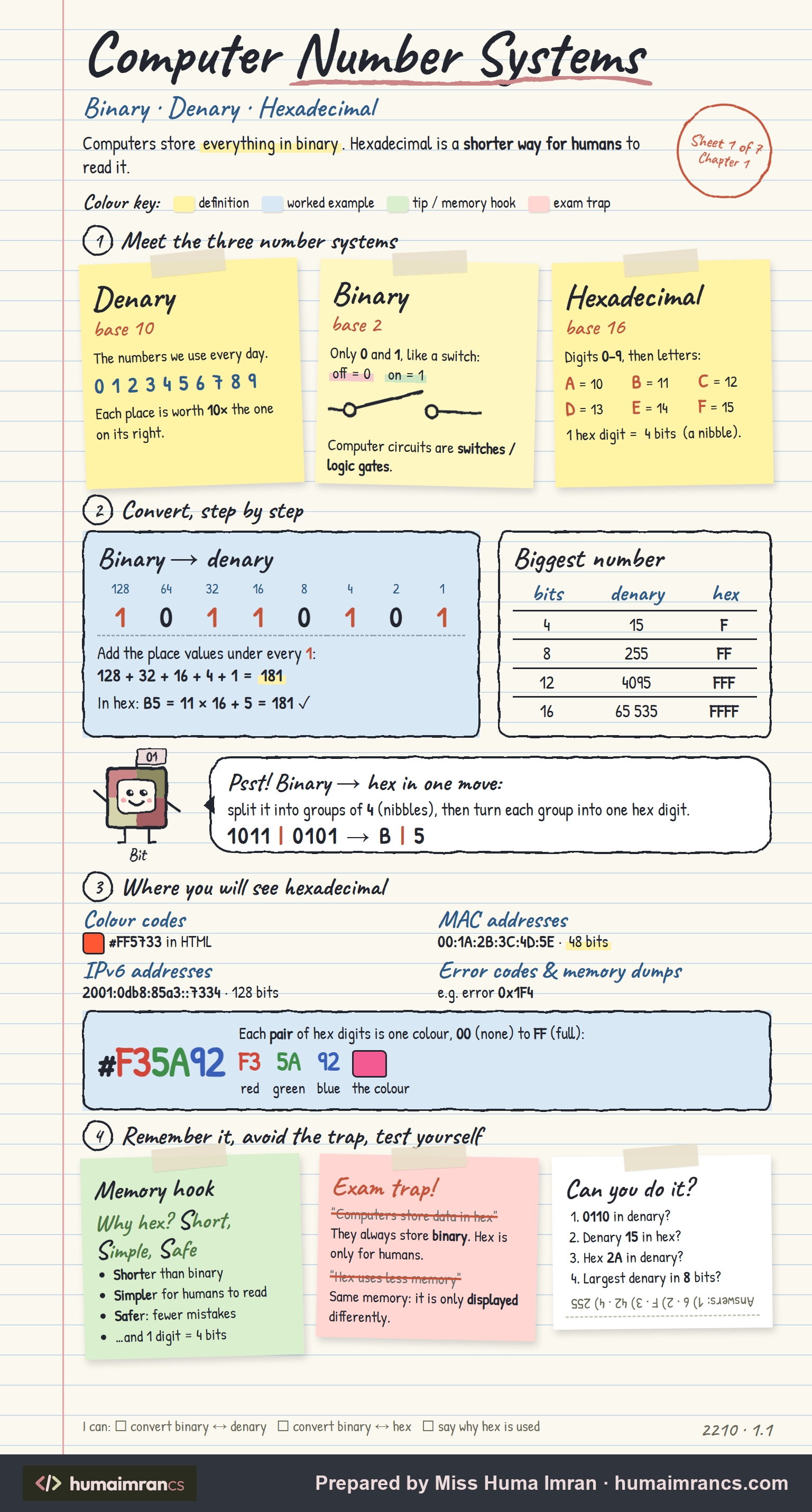
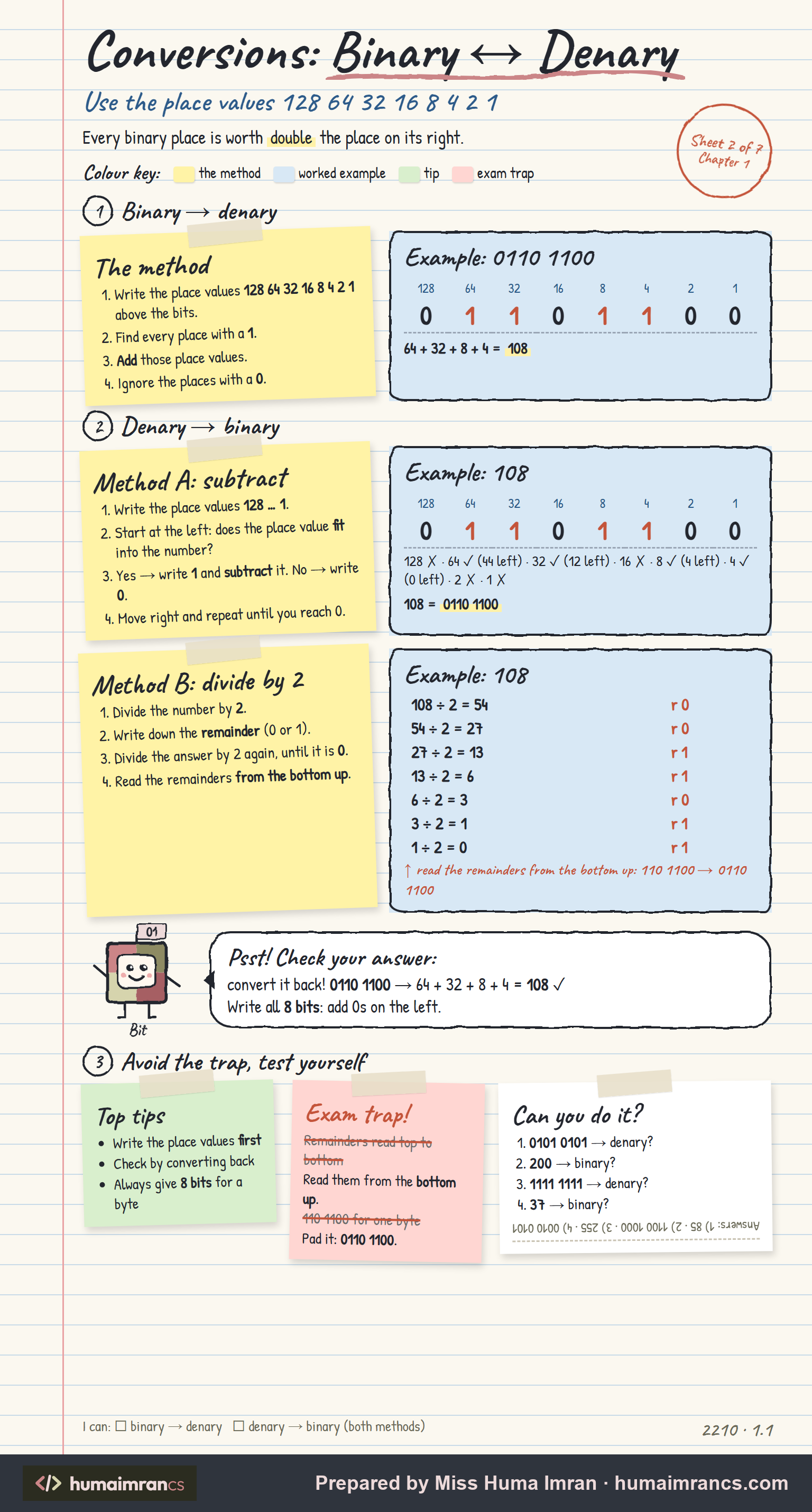
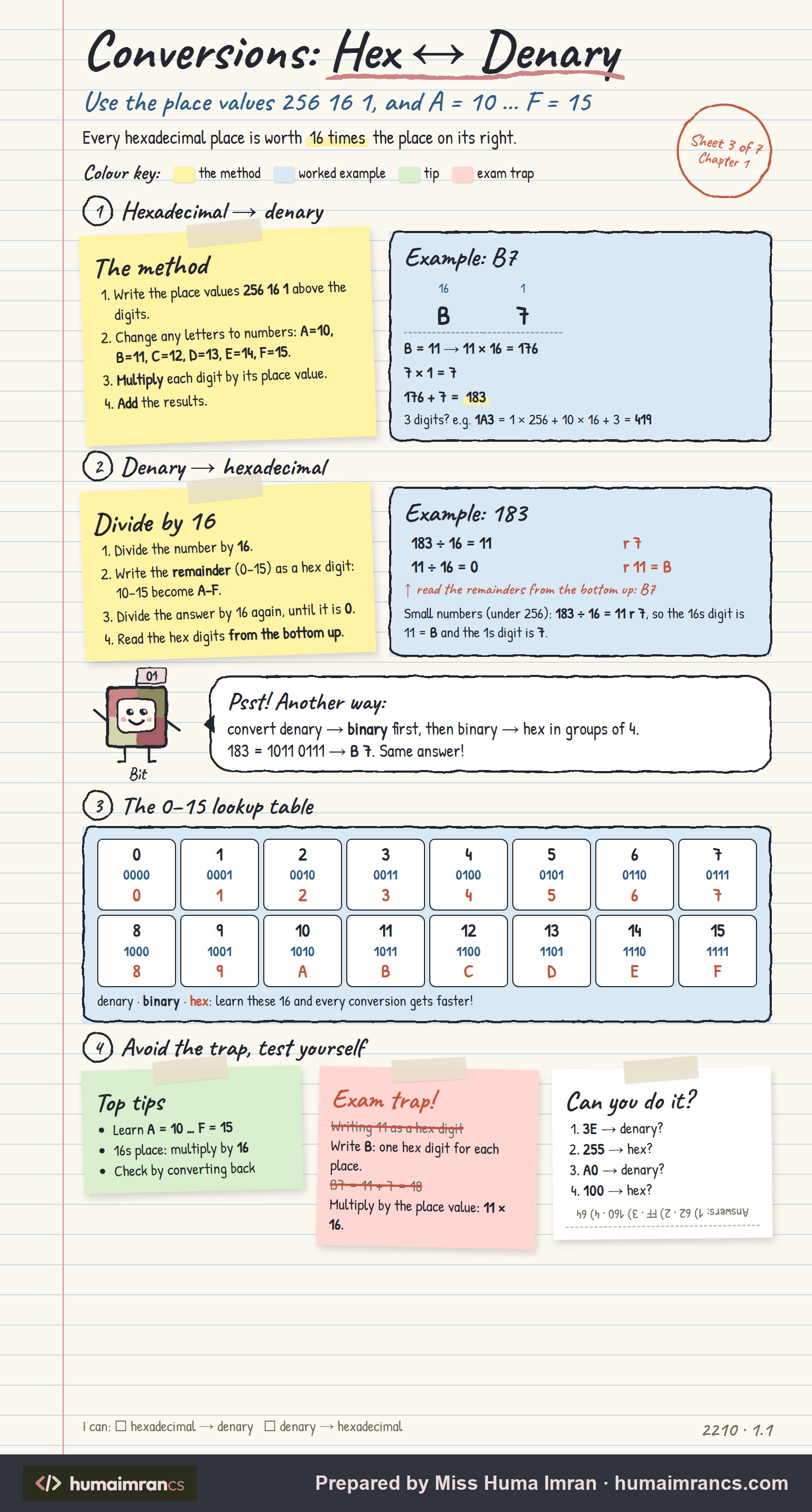
Infographics
Quick-revision infographics for this chapter.
 Prepared by Miss Huma Imran